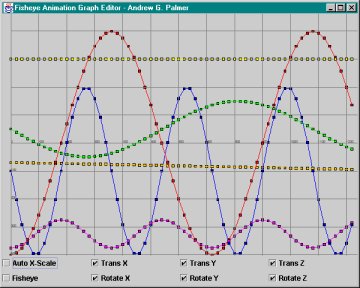
One of the challenges animators often face when using graph editors in motion capture data viewers, such as MotView, or when using animation software, such as Maya, is limited viewport of the data. Either a small span of time of a joint's channels are displayed where the user is able to easily edit the data, or a large span of time is tightly scaled into the viewport and squeezed so that the detail is lost in a tangle of un-editable channel lines. When working in a graph editor where the xScale = yScale, long time spans are difficult to edit because only a fraction of the whole time can be displayed at one time, such as in this example:
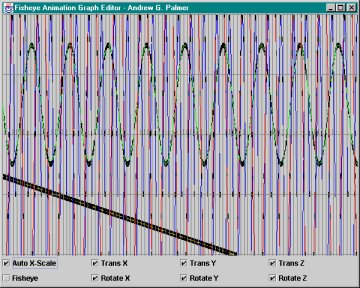
One approach to solving this is to scale the whole timespan into one view. While this displays the entire sequence of data, it is then too complicated to pick out any detail or single node to edit, as in this example:
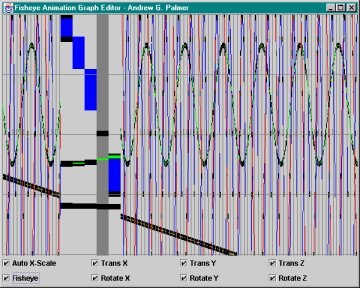
A Fisheye Animation Graph Editor provides an efficient mechanism for viewing a long timespan of motion data and gives a means to reliably edit the joint channels at the same time. The Fisheye would dynamically change the X scale (representing Time) under the mouse cursor in the graph editor. This eliminates the need for buttons, scroll bars or hierarchies in editing such data. Under the cursor, the channels look spread out. Outside the fisheye window, the channels are compact. This greatly improves viewing and editing. It also aids in spotting and editing of both repetitive motions and boundary motions, such as in this example:
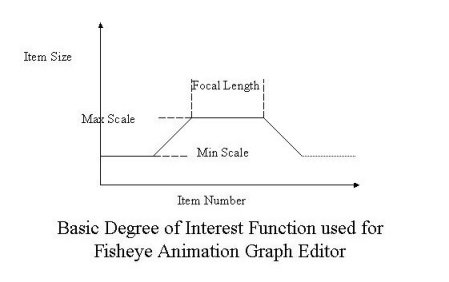
The standard approach to implementing a fisheye distortion technique is to compute a "Degree of Interest" (DOI) function for each element to be displayed. The DOI function calculates whether to display an item or not, and it calculates the item's size. Typical degree of interest functions include both the distance of an item from the focus point as well as the item's a priori importance.
Notes on Project 2:
The idea of applying visualization techniques to editing computer animation
is an interesting one. It's also one that I found was more challenging
to come up with while still producing a project that contributed
to computer animation. I felt sure that, as I progressively assembled
an interface for this editor, a brilliant visualization technique would
unearth itself and grab me as an overwhelmingly incredible advantage for
working with motion capture data. This didn't happen. The truth
was that it was a struggle to come up a good way to improve mocap editing.
The Fisheye Animation Graph Editor emerged as a compromise on many fronts.
Yet, reading through the numerous papers about both visualization and computer
animation, and brainstorming ways to merge them might have been only somewhat
fruitful, but was nonetheless stimulating and insightful.